
Geni Tips: Exploring the Create a Branch Feature
When building out your family tree, you will occasionally come across a fascinating new line, a cluster of DNA matches, or historical records for individuals you know are part of your extended family history, but you just don’t know how they connect to the existing tree yet.
To help solve this puzzle on Geni, we created the Create a Branch feature. This free tool allows anyone to seamlessly start an unconnected family tree branch and build it out until a link to the World Family Tree is discovered.
How to Create a New Branch
Starting an unconnected branch on Geni is quick and straightforward.
1. Navigate to “Research”
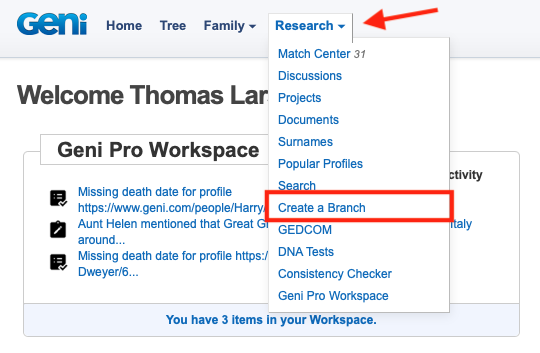
At the top of the page, click on “Research” and select “Create a Branch.”
2. Fill Out the Profile Details

You will be taken to a page featuring a form very similar to the standard “Add Relative” form. Enter all the known information for the person in this new branch.

If you have a GEDCOM file for this person, you can also import it by checking the box “Import a GEDCOM for this person.”
3. Save Your Changes

Once all the information is entered, click the “Save” button.
4. Build the Tree
If you have elected to import a GEDCOM file, you will next be taken to the GEDCOM import page to begin the process of importing the tree to Geni.
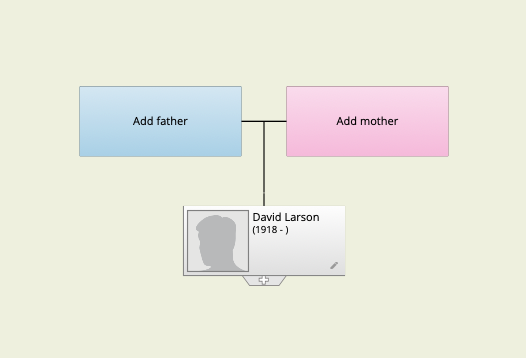
Otherwise, you will automatically be directed to the tree view for this newly created profile. From here, you can click on the + tab to add parents, siblings, spouses, and children to build out this unconnected branch.
How to Find Your Branch Later
Don’t worry about losing track of your new tree! You can easily find these individuals again by typing the person’s name into the main Geni search box or by browsing the list of profiles you follow.
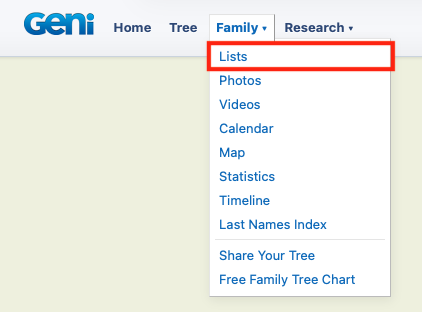
You can also find branches you created in your family list. Just click “Family” at the top of the page and select “Lists.”

In the dropdown at the right, select “Branches Added By Me.” This will provide a list of all the stand-alone branches you have created.
Organize Your Unconnected Branch Research with the Geni Pro Workspace
If you are a Geni Pro subscriber, you can take your unconnected branch research to the next level using the newly released Geni Pro Workspace. Because working on an unlinked branch may involve some speculative research, theories, and “work-in-progress” tracking, the Geni Pro Workspace is the perfect place to manage your leads before making them public.
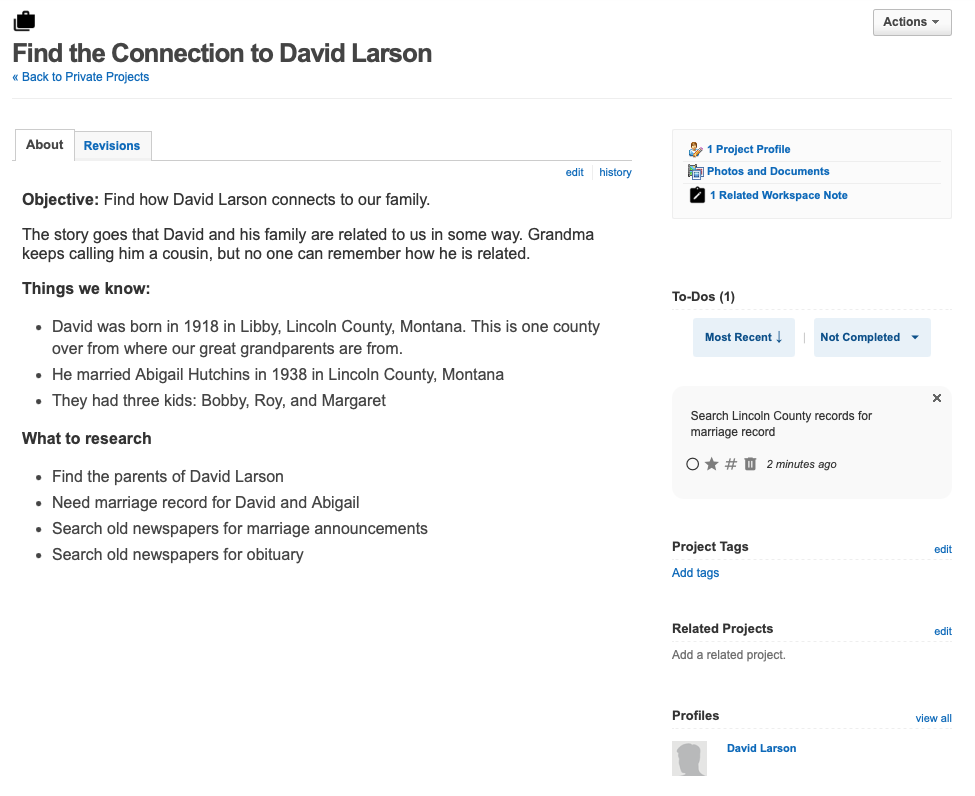
Private Projects: Start a private project specifically dedicated to solving the connection of your new branch. You can tag the unconnected profiles to this project, upload documents, and map out your theories without sharing unverified information publicly. Private projects also have their own notes and to-dos, so you can keep all related items in one place.
Research To-Dos: Create quick, actionable checklist items as you investigate the new branch. If you notice a missing birth record or a census discrepancy that might hold the key to connecting the branch to the World Family Tree, simply create a new to-do item.
Profile Notes: Need to jot down a theory about a specific unconnected person? You can use the Workspace tab right on their profile page to create personal notes that only you can see, keeping the public profile clean and factual while you work out the kinks.
The Geni Pro Workspace allows you to keep all your notes, theories, and task lists right alongside your unconnected branch, preventing your research from getting lost in scattered paper files or external apps.
Best Practices
While the Create a Branch tool is incredibly powerful, it should be used responsibly to keep Geni’s collaborative environment clean and accurate. Here are some things to keep in mind before using Create a Branch:
- Search Before You Create: Always do a search on Geni before creating a new branch. If the profile already exists, creating a duplicate means you, your collaborators, and Geni curators will have to spend valuable time merging them later.
- Don’t Use it for Known Connections: If you already know exactly where a person fits into the tree, do not create a separate branch. Go directly to the existing profile in the tree and add them there.
Do you have an unconnected tree you are itching to build? Start a new branch now!





 Genealogy Discussions
 Genealogy Projects
 Popular Genealogy Profiles
 Surnames
 The Geni Blog
 The World Family Tree